claudectl
Hive mind for Claude Code - expand your consciousness with an agentic hive that learns from you once and remembers everywhere
Know which agent is blocked, burning budget, or stalled - on this machine or any machine in your hive - and intervene without tab hunting.

Install
Then wire up Claude Code hooks and start the dashboard:
claudectl init      # onboarding wizard (budget, brain, hooks, bus, skills)
claudectl doctor    # verify install + runtime health
claudectl           # launch dashboard
Or try it without Claude Code running:
See the Quick Start for the full walkthrough.
Features
Live Dashboard
See every session's status, burn rate, context usage, activity sparkline, CPU, memory, and subagent rows in one place.
Intervene Fast
Approve prompts, send input, jump to the right terminal tab, or kill a runaway session - without leaving the dashboard.
Budget Enforcement
Set per-session or daily spending limits. Alert at 80%, auto-kill at 100%. Track live $/hr burn rate.
Local LLM Brain
A local model (ollama/gemma) watches sessions, auto-approves safe commands, denies dangerous ones. Learns from your corrections. All on-device.
Auto-Rules Engine
TOML rules to approve, deny, send, terminate, route, or spawn based on tool name, command pattern, project, or cost threshold.
Health Monitoring
10 automatic checks: stalled sessions, context saturation, cache ratio, cost spikes, retry loops, cognitive decay, proactive compaction, token efficiency, error acceleration, and repetition detection - no config needed.
Multi-Session Orchestration
Run dependency-ordered task graphs across sessions. Decompose prompts into parallel DAGs.
Event Hooks
Trigger desktop notifications, shell commands, and webhooks when sessions need attention.
Session Recording
Press R to record a session highlight reel as a GIF. Extracts edits, commands, errors - strips idle time.
Relay & Hive Mind
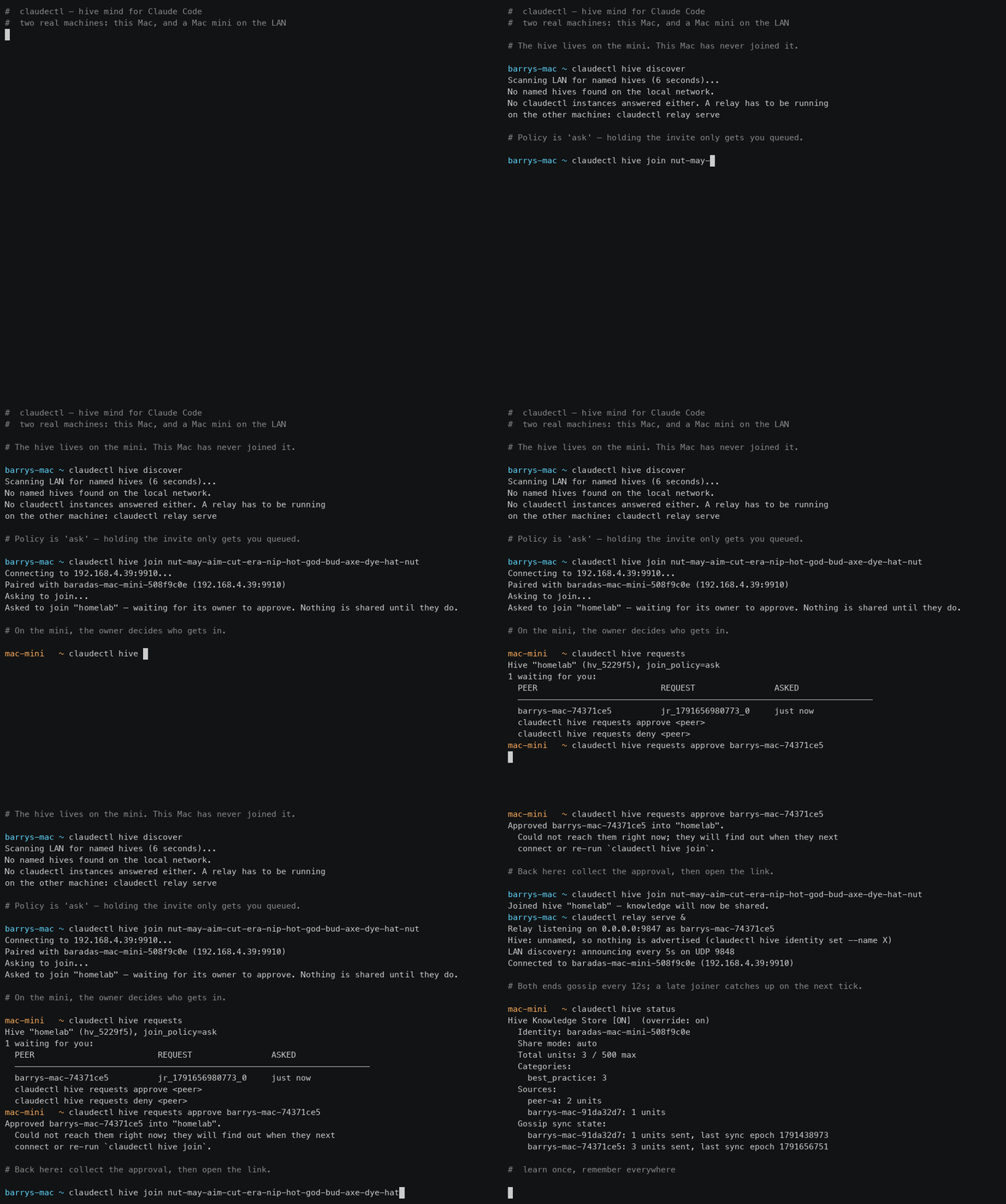
Connect claudectl instances across machines. Share brain learnings, delegate tasks, and build a convergent hive mind - all peer-to-peer. Learn more
Agent Bus (preview)
Durable role directory + persistent mailbox exposed as an MCP server. Running Claude Code instances discover each other, look up their own role, send directed messages, and drain their inbox at turn boundaries. Phases 1-4 of the design spec are shipped, and bus is in the default build.
Headless Daemon
Run without the TUI via --headless. Brain, coordination, and context rot prevention stay active while you work. Attach a dashboard from another terminal anytime.
Session Autopsy
Post-mortem analysis on completed sessions via --autopsy. Inspect what went wrong, what burned cost, and where the session stalled - after the fact.
Screenshots
Skills & Hive mode (press K in the dashboard):

Status Detection
Multi-signal inference from CPU usage, JSONL events, and timestamps:
| Status | Meaning |
|---|---|
| Needs Input | Waiting for user to approve/confirm a tool use |
| Processing | Actively generating or executing tools |
| Waiting | Done responding, waiting for user's next prompt |
| Unknown | Process alive, but transcript telemetry unavailable |
| Idle | No recent activity (>10 min) |
| Finished | Process exited |
Terminal Support
| Terminal | Launch | Switch | Input | Approve |
|---|---|---|---|---|
| Ghostty | - | Yes | Yes | Yes |
| tmux | Yes | Yes | Yes | Yes |
| Kitty | Yes | Yes | Yes | Yes |
| Warp | - | Yes | Yes | Yes |
| iTerm2 | - | Yes | Yes | Yes |
| Terminal.app | - | Yes | Yes | Yes |
| WezTerm | Yes | Yes | - | - |
| GNOME Terminal | Yes | - | - | - |
Run claudectl doctor to verify your install + terminal support in one command. See Terminal Support for setup notes.
How It Works
claudectl reads Claude Code's local data - no API keys, no modifications to Claude Code, and no network traffic until you pair a relay peer or wire up a webhook:
One exception, opt-in and off by default: the read-only query surface can send a third party's question and one paragraph of
CLAUDE.mdto a hosted classifier. It needsTYPESAFE_API_KEYto be set, and[query] jev_enabled = falseis the hard off. Nothing else in claudectl requires an API key, and no index content, file body or session data is ever sent. See Capability Grants.
~/.claude/sessions/*.json- session metadata~/.claude/projects/{slug}/*.jsonl- conversation logs with token usageps- CPU%, memory, TTY for each process
Status inference combines multiple signals: waiting_for_task events, CPU usage thresholds, stop_reason fields, and message recency.
Security
claudectl reads Claude Code's local files and ps. It does not:
- Modify Claude Code's files or behavior
- Require API keys or authentication
- Run with elevated privileges
- Send anything anywhere you have not wired up yourself
Four things can leave the machine, all of them something you turn on: webhooks
(session metadata — project, cost, status), the relay (session snapshots and
delegated tasks, to peers you paired with over an HMAC-authenticated link), the
hive (knowledge units, to members of a hive you named and admitted them to),
and the Jev classifier on the query surface (a third party's question plus one
paragraph of CLAUDE.md, never index contents or session data — it needs
TYPESAFE_API_KEY, and [query] jev_enabled = false is the hard off). Pair with
nobody and set no key, and nothing is sent.
Built With
- Rust - systems language
- ratatui - TUI framework
- crossterm - terminal manipulation
- Ollama - local LLM inference (for brain mode)
License
MIT